What If Every Note Could Become an App?
People build small menu-bar applications, personal tool websites, browser extensions, and phone apps. These projects may solve one small problem or exist simply because they are fun to make.
The common desire is to build our own software and keep it somewhere easy to reach. Building has become much easier, especially with coding agents. Hosting, installing, organizing, and returning to all those small applications is still awkward.
What if there were a notebook where every note could become an app?
Personal software needs a home
A macOS menu bar can host small personal utilities, but every utility still needs to be packaged and installed. A browser extension lives inside the browser and must follow the extension platform.1 A personal website can collect web tools, but browser applications cannot use every native desktop capability. Putting a private application on an iPhone brings another set of distribution steps.
None of these approaches is wrong. The friction comes from repeating the full application lifecycle for software that may only be used by one person.
People are already making collections of small tools. Simon Willison’s tools and Yummy Jars2 (yummyjars.com, a self-hosted shelf for small web apps and tools) show how useful a simple web shelf can be. I want to explore the same idea as a desktop workspace where creating and hosting happen together.
A notebook made of applications
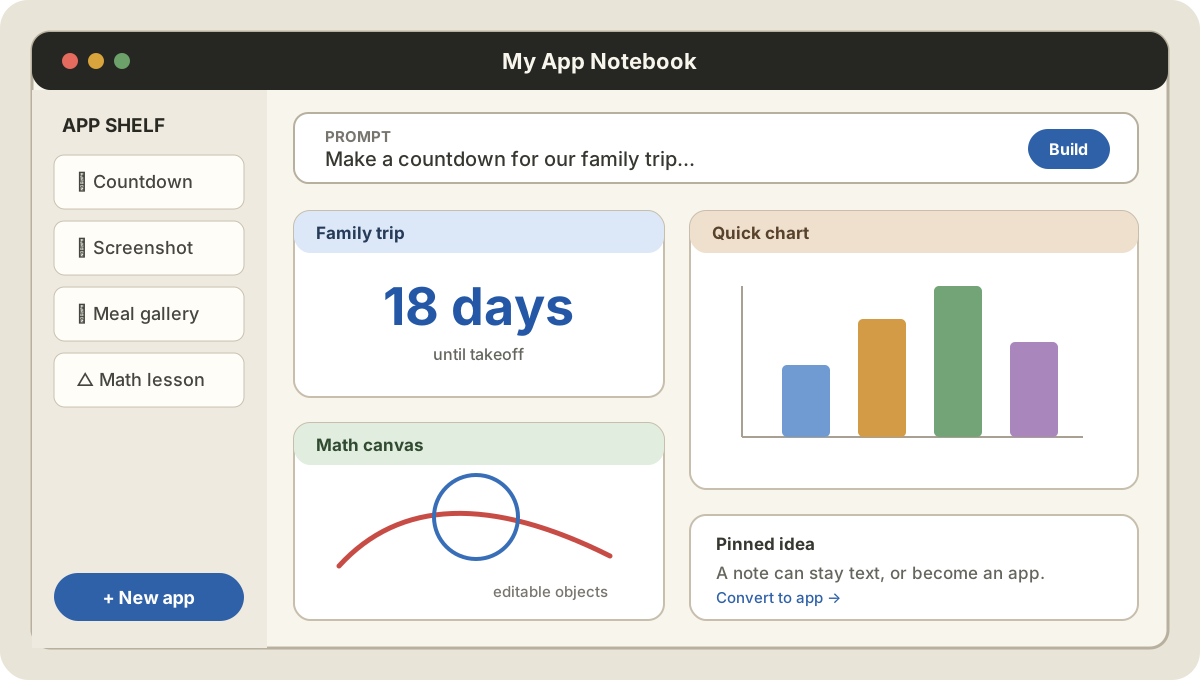
The interface could start like a normal notebook or canvas. A blank card accepts a prompt or a small piece of code. Once it becomes interactive, the card is no longer only a note. It is an application that can be resized, arranged, reopened, and connected to other cards.
One card might be a countdown. Another might annotate a screenshot, track a personal list, visualize a dataset, or control a local tool. A larger app could open in its own window while smaller ones remain pinned like sticky notes.
The experience would combine several familiar ideas:
- a notebook for organizing thoughts
- a canvas for arranging related work
- a window manager for controlling small applications
- a toolbox for keeping utilities nearby
- a local host for running what was just created
The important part is the in-place transition. I should not need to leave the notebook, create a repository, configure a build, package an application, install it, and then return. I should be able to begin with an idea and turn it into a working tool in the same place.
A gallery, not only a toolbox
Personal software does not always need to be useful. People display work they are proud of through personal websites, writing, drawing, teaching, speaking, acting, images, and video. Software can belong in that collection too.
A personal app shelf could be a gallery or display cabinet. It might hold my own tools, a teaching site from my dad, or a collection of projects made by my children. Some applications would solve daily problems. Others would be playful experiments or small pieces of interactive art.
This matters because usefulness will not be the only scarce quality as AI makes software easier to produce. Fun, taste, identity, and pride in creation still matter. People may build an app for the same reason they draw a picture or print a small object: they wanted it to exist.
A public gallery could also collect small applications from people whose work I follow. Instead of reading another list of links, I could open the actual tools, understand how they work, and make my own variation.
Why start on the desktop
A phone is an appealing destination, but distribution and platform restrictions make it a harder place to begin. The desktop is a more practical test ground. A host application can provide local storage, native APIs, process control, and a larger canvas while still placing clear limits around what each small app can do.
There are several technical directions worth exploring:
- a native desktop shell with embedded web views
- a simple local application runtime using HTML, CSS, and JavaScript
- capability-based access to files, commands, and native APIs
- lightweight isolation for applications that need stronger boundaries
- a notebook data model that stores source, state, permissions, and presentation together
HTML, CSS, and JavaScript may be enough for the first version. The point is not to invent another application framework. It is to make the path from idea to personal software feel as direct as writing a note.
Building at a higher level
When everyone can generate another small application, it becomes useful to think one level higher. Where do those applications live? How are they arranged? How does a person trust them, keep them, show them, and use them again?
A notebook for apps is one answer. Start with an empty page, describe what you need, and let the page become the tool. Over time, the notebook becomes a personal software collection that is practical, expressive, and entirely your own.
Footnotes
-
Chrome for Developers, Extensions documentation. ↩
-
Simon Willison’s tools and Yummy Jars are examples of web shelves for small tools. ↩