Inside Hoasis: My Hybrid Homelab
My homelab, a.k.a. Hoasis as I call it, has recently settled into a stable setup, with no major changes beyond adding an alert for failures in the dynamic DNS reconciliation handled by an internal service called Hoasis Butler, which I introduce below. This feels like a good time to write down and share how I got here, how it works, and what it looks like today.
What I use it for
The lab is not only a collection of machines for learning infrastructure. My family and I actually use it.
- Family chat: Matrix Synapse has quietly handled daily conversations between my wife and me since October 2024.
- Files and collaboration: Nextcloud All-in-One gives us private file storage and collaboration services.
- Notes: Joplin Server syncs notes across devices.
- Home automation: Home Assistant connects sensors, televisions, garage state, air-quality data, notifications, dashboards, and family automations. A local Nanit relay also brings the baby-monitor stream into the same system.
- Cleaner home DNS: AdGuard Home filters unwanted domains while giving private services memorable local names.
- Personal software: YummyLog (yummylog.yummyjars.com, a full-stack app for keeping a food image gallery) and Yummy Jars (my.yummyjars.com, my private LAN version of public yummyjars.com where I keep extra apps for my own use) both have a place to run.
- Remote access: WireGuard lets our devices return to the home network without publishing every service to the internet.
Some of these services could be replaced by hosted products in an afternoon. That is not entirely the point. I like building things I personally use, my family benefits from them, and running the whole stack is fun. The fact that it occasionally turns me into the household SRE is part of the deal.
What is behind it now
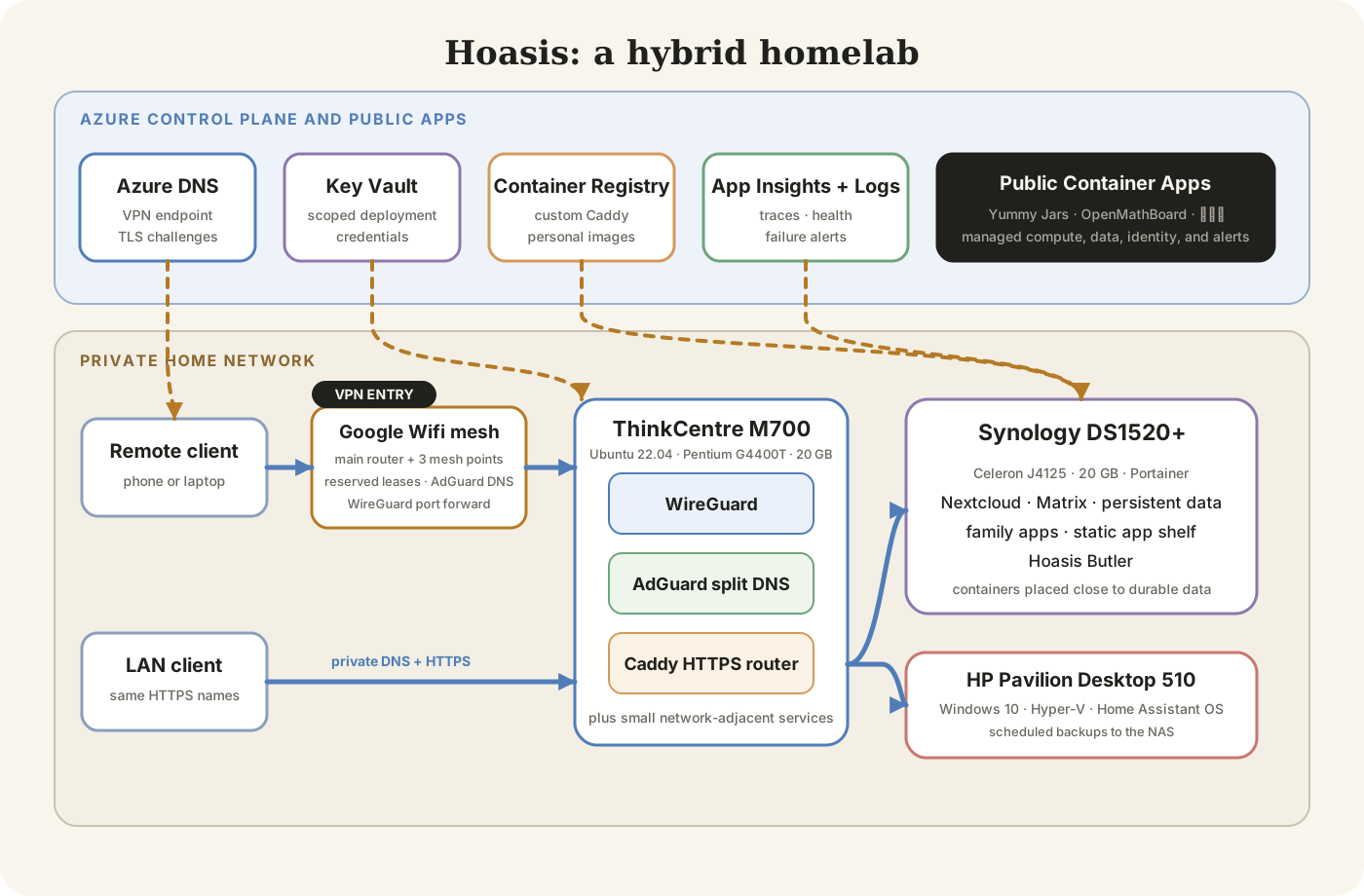
The current architecture uses three home machines plus a small Azure control plane. It is not the perfectly symmetrical cluster I imagined years ago. It is shaped by the hardware I own, the services we use, and which failures I am willing to debug during family time.
Compute
The compute layer is a mixed little fleet.
The HP Pavilion Desktop 510 is the oldest machine in the group. I bought it about ten years ago and later upgraded its RAM and replaced the original storage with an SSD. Windows 11 does not support it, but Windows 10 remains stable and the machine still works like a charm. It now runs Home Assistant OS inside Hyper-V.
I originally hosted Home Assistant as a container on Kubernetes. That worked, but Home Assistant OS is simply a better fit for how I use it. The integrated add-on store and managed appliance experience make upgrades and supporting services much easier than rebuilding every add-on as another container stack. After fatal upgrade failures made recovery necessary, I also started sending scheduled Home Assistant backups to the NAS. “The lights stopped working after your deployment” is not a good incident report to receive from your family.
The Lenovo ThinkCentre M700 is the Ubuntu edge and utility server. It has an old dual-core Intel Pentium G4400T, but a RAM upgrade brought it to 20 GB, which is more than enough for a small Linux server. It runs Ubuntu Server 22.04 and has been nearly boring in the best possible way. I checked it while writing this article and it had been up for more than eleven weeks. Other than power outages, it has never given me meaningful trouble.
The ThinkCentre runs Docker and Portainer stacks for AdGuard, WireGuard, Caddy, Joplin, and smaller network-adjacent services. It is always on and sits close to the traffic path, so it is the natural place for the services that help everything else become reachable.
The Synology DS1520+ began as storage. It has an Intel Celeron J4125 and, after a memory upgrade, 20 GB of RAM. I eventually realized it also works perfectly well as a normal compute server. It now runs Docker workloads for Nextcloud, Matrix, personal applications, the Yummy Jars platform (my.yummyjars.com), and Hoasis Butler while still owning the persistent data underneath them.
I installed Portainer Agent on both the Ubuntu server and the NAS, which lets me treat them as one small container platform without pretending they are identical machines. Stateful services stay close to durable storage, while network-facing utilities stay on the Ubuntu edge host.
The three machines have different operating systems, hardware, and jobs. I no longer try to hide all of that behind one grand abstraction. The boundaries are explicit, which makes failures easier to locate.
Networking
The network design is the part I am happiest with because it produces a very simple user experience.
The LAN starts with a Google Wifi main router at 192.168.86.1 and three mesh points around the house. The router handles DHCP, with reservations for the compute nodes and other infrastructure that need stable addresses. It forwards the WireGuard UDP port to the ThinkCentre and uses the ThinkCentre as its custom DNS server.
AdGuard Home runs on that Ubuntu machine. It handles filtering and DNS rewrites, including the private *.yummyjars.com wildcard. Caddy terminates HTTPS and routes each hostname to the right service on the LAN.
Away from home, the path begins differently. I run WireGuard through wg-easy, which provides the server container and a small management interface while leaving the actual tunnel behavior visible and configurable.
- Public Azure DNS resolves the dedicated VPN endpoint to my current home address.
- The router forwards one UDP port to WireGuard.
- After the tunnel connects, the VPN profile sends DNS queries directly to AdGuard.
- AdGuard returns the same private service address used at home.
- Caddy routes the request to the correct machine and container.
This means wg.yummyjars.com and adg.yummyjars.com work on the LAN and over VPN, but they are not normal public websites. Public DNS only needs to expose the entrance. The rest of the names become useful after the client is inside.
Caddy gets a wildcard certificate through an Azure DNS challenge.1 Internal services can therefore use trusted HTTPS names without opening each service to the public internet.
*.yummyjars.com {
  tls {
    dns azure {
      subscription_id {$AZURE_SUBSCRIPTION_ID}
      resource_group_name {$AZURE_RESOURCE_GROUP_NAME}
      tenant_id {$AZURE_TENANT_ID}
      client_id {$AZURE_CLIENT_ID}
      client_secret {$AZURE_CLIENT_SECRET}
    }
  }
}

joplin.yummyjars.com {
  reverse_proxy joplin-host:22300
}
The Caddy image includes the Azure DNS module and is stored in Azure Container Registry.2
WireGuard also taught me that “connected” and “working” are different states. Mobile and overseas networks can add encapsulation, restrictive NAT, and smaller path MTUs. The tunnel would sometimes establish successfully while sustained SSH or screen-sharing traffic stalled. A conservative MTU, persistent keepalives, DSCP clearing, and TCP MSS clamping fixed those paths.
A successful handshake proves identity and basic reachability. It does not prove that the packets you care about can finish the trip.
Storage
The NAS is the center of persistent data. Container volumes, Nextcloud data, databases, application state, and backups live there rather than on whichever compute node happens to be running a process today.
Home Assistant sends scheduled backups to the NAS. That stopped being optional after upgrade failures forced me to recover the setup instead of merely restarting it. Earlier Kubernetes versions of the lab also used NAS-backed NFS volumes, which taught me quite a lot about the difference between “the pod restarted” and “the data survived.”
I try to keep databases close to their applications while keeping the underlying data on storage I know how to back up. This is not a sophisticated distributed-storage system. It is a practical answer to an important family question: if this machine dies, do we still have the photos, notes, and configuration?
Azure resources
The homelab runs at home, but Azure handles a small set of jobs that are better placed outside it:
- Azure DNS hosts the public zone and VPN endpoint.
- Azure Key Vault stores deployment credentials outside the repositories.
- Azure Container Registry carries custom Caddy and personal application images from build to deployment.
- Application Insights and Log Analytics receive Hoasis Butler traces and logs.
- Azure Monitor checks Butler exceptions every fifteen minutes and emails me when a reconciliation or DNS-update exception appears.
Only two public DNS records matter to the homelab path. The hoasis A record stores the current residential WAN address with a five-minute TTL, and Hoasis Butler keeps it reconciled. The vpn CNAME follows hoasis.yummyjars.com, giving clients a stable VPN hostname.
There are no public wg, adg, joplin, or other private-service records. AdGuard creates those names only on the LAN and inside the VPN. The zone contains a few other records for the public Yummy Jars application (yummyjars.com) and email verification, but they are unrelated to homelab access.
The same Azure subscription also hosts public applications. Yummy Jars (yummyjars.com), OpenMathBoard (lezhi.school, an open-source math whiteboard), and 乐之翁 (lezhiweng.com, an educational website hosting high-school math materials curated by my dad) run in managed Container Apps environments with separate registries, monitoring, logs, certificates, and availability or error alerts. 乐之翁 (lezhiweng.com) also uses managed PostgreSQL, Blob Storage, Key Vault, managed identity, and Azure Communication Services email.
That creates a useful boundary. Private household and admin services stay behind WireGuard at home. Applications intended for the public run on managed cloud infrastructure with independent deployment and monitoring.
Hoasis Butler, the tiny cloud-to-home bridge
Hoasis Butler exists because residential public IP addresses can change while a VPN hostname must keep pointing home. Every few minutes, the Flask service reads the current public address, compares it with Azure DNS, and updates the record only when they differ.
public_ip = read_current_public_ip()
dns_ip = read_azure_dns_record()

if public_ip != dns_ip:
    update_azure_dns_record(public_ip)
The real implementation wraps those operations in OpenTelemetry spans, emits structured logs, and exposes a traced health endpoint. Application Insights makes this tiny background job observable.3
I recently added that exception alert around the reconciliation loop. For a long time, I had traces and logs but no email when the job threw, which was a very enterprise-looking way for the only operator to still get locked out.
The deployment path is hybrid too:
local build
  -> container image
  -> Azure Container Registry
  -> Portainer API
  -> NAS container
  -> OpenTelemetry back to Azure Monitor
A deployment script builds the Linux image, pushes it to ACR, and creates or updates the Portainer stack. Secrets are fetched from Key Vault into an ignored deployment environment file, scoped to a service-specific prefix. At runtime, the Azure SDK uses an explicit environment credential rather than searching through a long default credential chain.
Butler briefly accumulated extra jobs, including device-restore automation and Azure network-rule reconciliation. I later removed them. Returning it to one responsibility made it easier to understand, deploy, and monitor. Even a home butler needs a reasonable job description.
How I got here
The Git history starts in October 2021 and reads like an infrastructure lab notebook, including all the crossed-out ideas and rebuilds that a clean architecture diagram politely hides.
2021: start with Kubernetes because it was what I knew
Kubernetes was not a random place to begin. At work, I had built an Azure Kubernetes Service pull-request preview system that packaged applications with Docker and deployed each change to an isolated namespace with its own TLS URL. That experience made Kubernetes feel like the natural starting point for my homelab and gave me a place to look below managed AKS. I used kubeadm to bootstrap a control-plane node, joined workers, configured Calico networking and MetalLB addresses, and deployed Home Assistant with persistent storage.
This was an objectively large amount of infrastructure for turning lights on and off, but it forced me to learn certificates, pod networking, service exposure, scheduling, storage, and node failure. I also learned why changing node addresses can ruin an otherwise quiet holiday.
2022 and 2023: rebuild until the boundaries make sense
I connected Home Assistant to InfluxDB and Grafana, rebuilt the cluster across bare-metal and virtualized nodes, and moved persistent storage onto the NAS through NFS. A later version combined two physical nodes with a Hyper-V worker.
The rebuilds made network, storage, and certificate boundaries concrete. They also showed me where Kubernetes was teaching useful platform concepts and where it was charging operational rent for a family service that did not need it.
2024: make it useful enough for the family
The lab expanded beyond an orchestration exercise. I added Matrix, Nextcloud, Portainer, WireGuard, AdGuard, Ollama, and Open WebUI. Hoasis Butler started reconciling dynamic DNS and exporting telemetry to Azure.
Matrix is the best test of whether the lab became useful. My wife and I kept using it. It did not require weekly repair, a migration back to a hosted chat service, or a family postmortem. That boring reliability is probably the achievement I am proudest of.
The focus shifted from “can I run a cluster?” to “can my family rely on these services?” Backup, recovery, remote access, understandable URLs, and failure visibility became more important than keeping every workload in Kubernetes.
At the scale of three home machines and a handful of users, Docker and Portainer could do the job with much less ceremony. I still wanted containers, repeatable configuration, health, logs, restarts, and a central place to manage deployments. I did not need a scheduler and control plane for every family app. Moving to simpler container stacks was not giving up on Kubernetes; it was finally right-sizing the infrastructure.
2025 and 2026: simplify the path and remove cleverness
Caddy became the common HTTPS entrance. Wildcard certificates and split DNS allowed the same names to work at home and over VPN. Most day-to-day applications settled into straightforward Portainer-managed container stacks, while the repository kept the Kubernetes work as useful infrastructure archaeology.
I retired services that no longer earned their operational cost, consolidated personal web tools under Yummy Jars (my.yummyjars.com), separated the reverse proxy from the NAS, and hardened WireGuard for constrained networks. The latest topology change sends VPN DNS directly through AdGuard so remote and local clients see the same private names.
The current design is not the most complicated version I built. That is a feature.
What I apply and what I learn
I bring parts of my work experience into the homelab: cloud infrastructure, deployment automation, distributed tracing, monitoring, and thinking through failures before they happen. The learning also runs in the other direction. Building and operating the system has taught me a ton about the details hidden behind architecture diagrams.
Documenting the topology has become more useful in the AI era. I can point a coding agent at TOPOLOGY.md, the service configuration, and the Git history, then ask it to trace a broken route or explain why a DNS change did not behave as expected. It feels a little like having a tiny version of Azure SRE Agent on call for my house. I still review the diagnosis and commands before applying them, because giving an enthusiastic agent unsupervised access to DNS, routing, and the family lights would be a different kind of homelab experiment.
Across its different versions, the lab has made me practice networking, platform engineering, cloud resources, container delivery, security, observability, backups, and the less glamorous work of retiring things I no longer need. The most important part is not knowing each product. It is being able to trace a request from a remote phone, through public DNS and a VPN, into private DNS, through a reverse proxy, across a LAN, into the right container, and then back through logs and traces when something fails.
I keep doing this because I get to build something I personally use, my family benefits from it, and, of course, it is fun. The lab is still a work in progress, but now it has split DNS, automated certificates, telemetry, and a reasonably current topology diagram. That counts as progress.
Footnotes
-
Caddy documentation, DNS challenge. ↩
-
Microsoft Learn, Introduction to Azure Container Registry. ↩
-
Microsoft Learn, Application Insights overview. ↩